<?xml version="1.0" encoding="utf-8"?><feed xmlns="http://www.w3.org/2005/Atom" ><generator uri="https://jekyllrb.com/" version="4.3.2">Jekyll</generator><link href="https://www.rudi-horn.de/feed.xml" rel="self" type="application/atom+xml" /><link href="https://www.rudi-horn.de/" rel="alternate" type="text/html" /><updated>2025-06-15T09:26:03+00:00</updated><id>https://www.rudi-horn.de/feed.xml</id><title type="html">Rudi Horn</title><subtitle>Projects involving computers, electronics and other interesting things. © 2025 - Rudi Horn</subtitle><entry><title type="html">Raspberry Pi XPT2046 / ADS7846 touch screen and Ubuntu classic</title><link href="https://www.rudi-horn.de/posts/2019/04/25/pi-ubuntu-touch-screen.html" rel="alternate" type="text/html" title="Raspberry Pi XPT2046 / ADS7846 touch screen and Ubuntu classic" /><published>2019-04-25T10:00:00+00:00</published><updated>2019-04-25T10:00:00+00:00</updated><id>https://www.rudi-horn.de/posts/2019/04/25/pi-ubuntu-touch-screen</id><content type="html" xml:base="https://www.rudi-horn.de/posts/2019/04/25/pi-ubuntu-touch-screen.html"><![CDATA[<p>I have an HDMI 800x480 touch screen for the raspberry pi labelled “5 inch HDMI
LCD V2”, which specifies that it has an XPT2046 Touch Controller. I was having
difficulties getting the touch controller to work together with Ubuntu
‘classic’.</p>

<p>Most tutorials to get the device to work simply specify that all you have to do
is add the following to <code class="language-plaintext highlighter-rouge">/boot/config.txt</code>:</p>

<div class="language-plaintext highlighter-rouge"><div class="highlight"><pre class="highlight"><code>dtparam=i2c_arm=on
dtparam=spi=on
dtoverlay=ads7846,penirq=25,speed=10000,penirq_pull=2,xohms=150
</code></pre></div></div>

<p>Unfortunately there are a few differences with how the ubuntu image is set up in
comparison to Raspbian. The first is that the config file is located in
<code class="language-plaintext highlighter-rouge">/boot/firmware/config.txt</code>. The second is that rather than using the raspbian
boot image for loading the linux kernel, the Ubuntu image uses <code class="language-plaintext highlighter-rouge">u-boot.bin</code>. By
default this setup doesn’t load any of the device tree overlay files, and so it
just ignores the <code class="language-plaintext highlighter-rouge">dtoverlay</code> configuration parameter. I’m sure it is possible to
get this to work, but for me the workaround was to <a href="https://wiki.ubuntu.com/ARM/RaspberryPi#Change_the_bootloader">revert to the raspberry pi
bootloader</a>.</p>

<p>In practice this means changing the first few lines of the config, changing the
kernel parameter and adding the initramfs line, while commenting out
device_tree:</p>

<div class="language-plaintext highlighter-rouge"><div class="highlight"><pre class="highlight"><code>kernel=vmlinuz
initramfs initrd.img followkernel
# device_tree_address=0x02000000
</code></pre></div></div>

<p>In addition to this, it is also necessary to copy the overlays to the boot
folder, as well as the chipset device tree file (note this file and the kernel
path may be different, just choose the latest kernel path and the correct bcm
file):</p>

<div class="language-bash highlighter-rouge"><div class="highlight"><pre class="highlight"><code><span class="nb">cp</span> <span class="nt">-r</span> /lib/firmware/4.15.0-1034-raspi2/device-tree/overlays/ /boot/firmware/
<span class="nb">cp</span> /lib/firmware/4.15.0-1034-raspi2/device-tree/bcm2709-rpi-2-b.dtb /boot/firmware/
</code></pre></div></div>

<p>After that the device should show up in <code class="language-plaintext highlighter-rouge">/dev/input/event0</code>.</p>

<p>You will probably still need to create the file
<code class="language-plaintext highlighter-rouge">/usr/share/X11/xorg.conf.d/99-ads7846.conf</code>:</p>

<div class="language-plaintext highlighter-rouge"><div class="highlight"><pre class="highlight"><code>Section "InputClass"
        Identifier "calibration"
        MatchProduct "ADS7846 Touchscreen"
        Option "Calibration" "3853 170 288 3796"
        Option "SwapAxes" "1"
EndSection
</code></pre></div></div>]]></content><author><name></name></author><category term="posts" /><summary type="html"><![CDATA[I have an HDMI 800x480 touch screen for the raspberry pi labelled “5 inch HDMI LCD V2”, which specifies that it has an XPT2046 Touch Controller. I was having difficulties getting the touch controller to work together with Ubuntu ‘classic’.]]></summary></entry><entry><title type="html">Simulating a PID control</title><link href="https://www.rudi-horn.de/posts/2017/10/03/simulating-pid.html" rel="alternate" type="text/html" title="Simulating a PID control" /><published>2017-10-03T10:30:00+00:00</published><updated>2017-10-03T10:30:00+00:00</updated><id>https://www.rudi-horn.de/posts/2017/10/03/simulating-pid</id><content type="html" xml:base="https://www.rudi-horn.de/posts/2017/10/03/simulating-pid.html"><![CDATA[<p>One thing that I have always wanted to do but never found the time for is
simulating a PID controller with a heat source. In the following I describe how
I do this in a small Excel spreadsheet.</p>

<p>The first nuisance related to this problem is that in order to simulate a PID
controller, we need an enviroment to simulate.</p>

<p>In our case we assume we have a medium which is divided into 5 compartments
labeled Tn, where n is a number between 1 and 5. \(T_1\) is heated by a heat
source, and the heat propagates through each of the compartments till it reaches
compartment \(T_5\), which contains our sensor. Each heat compartment dissipates
some heat along the way. This setup provides us with a non-linear, time delayed
and exponential setup. A figure is shown below.</p>

<p><img src="/images/posts/pid-simulation-model.png" alt="PID Simulation Model" />
<em>A simple model used by our simulation.</em></p>

<p>We first define a constant for the room temperature, which we call \(T_{env}\) and
we set it to 20 degrees Celcius. Then we define \(T\) loss, which is the amount
of degrees per minute per degrees Celcius which are lost.</p>

\[\begin{aligned}
T_{env} &amp; := 20 ^\circ C \\
T_{loss} &amp; := 1 {^\circ C \over \text{min} \cdot ^\circ C }
\end{aligned}\]

<p>This allows us to define the loss using the following equation:</p>

\[T_{n, loss} := T_{loss} \cdot { T_n - T_{env} \over 100 ^ \circ - T_{env}}\]

<p>This allows us to define the equation of each compartment in the next timestep.
The new temperature for compartments 2 to 5 are simply the average of
compartment \(n\) and compartment \(n-1\) (this could be weighted however) minus
the losses due to heat dissipation. For the first compartment, we set it to the
old temperature minus heat losses and add the heat depending on the duty cycle d
and assuming that the heating element becomes less effective as the heat rises.</p>

\[\begin{aligned}
T'_n &amp; := {T_{n-1} + T_n \over 2} - T_{n, loss} \mid n = 2 \dots 5 \\
T_{heat}  &amp; := 5 ^\circ C \\
T'_1 &amp; := T_1 + T_{heat} \cdot d \cdot { 150^\circ C - T_1 \over 150^\circ C - T_{env}} - T_{1, loss}
\end{aligned}\]

<p>Finally we can define our PID duty equation, which has a target temperature of
70 degrees celcius, and makes use of the proportional integral and differential
constants (\(K_p\), \(K_d\) and \(K_i\)).</p>

\[\begin{aligned}
T_{target} &amp; := 70 ^\circ C
d &amp; := \max(0, \min(1, K_p \cdot (T_{target} - T_5) + K_d \cdot (T^{-1}_5 - T_5) + K_i \cdot \sum_t T^t_5))
\end{aligned}\]

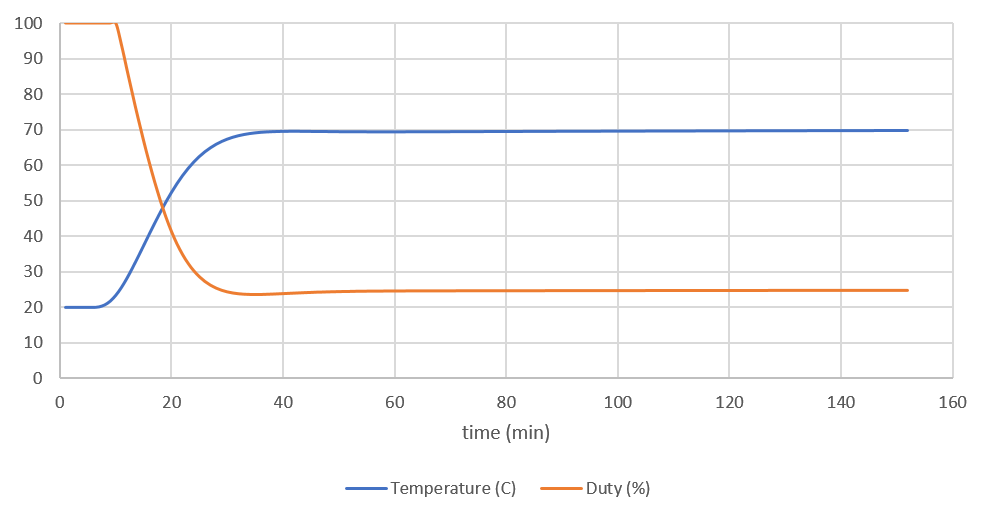
<p>Given these equations, it is possible to pick some values, which allow for a
fairly optimal graph. In this case the following values were chosen</p>

\[\begin{aligned}
K_p &amp; := {210 \over 10000} \\
K_d &amp; := - {610 \over 10000} \\
K_i &amp; := - {26 \over 10000}
\end{aligned}\]

<p><img src="/images/posts/pid-simulation-graph-all.png" alt="PID Simulation Graph" />
<em>The graph showing the results of the PID simulation.</em></p>
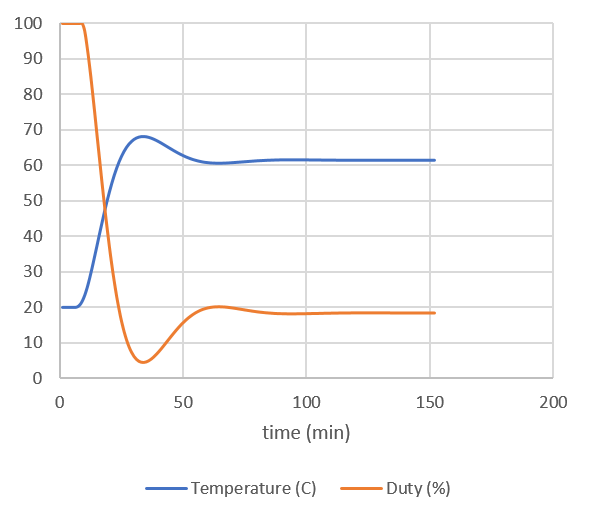
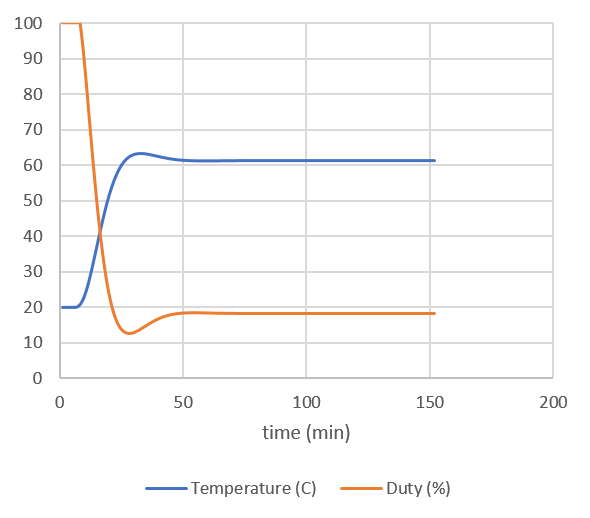
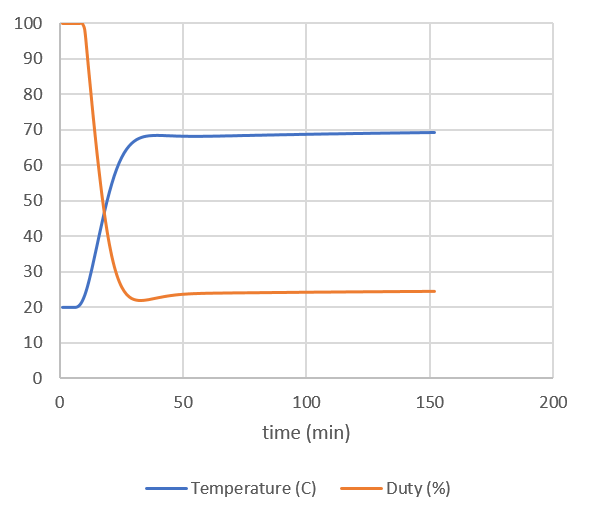
<p>The effects of the different parts of a PID can be seen in the three figures
below, the first being proportiona only, the second being proportional +
differential and the last being all three.</p>

<p><img src="/images/posts/pid-simulation-graph-p.png" alt="Proportional Simulation Graph" /></p>

<p><em>Effects of the proportional control.</em></p>

<p><img src="/images/posts/pid-simulation-graph-pd.png" alt="Proportional Differential Simulation Graph" /></p>

<p><em>Additional effects of the differential control.</em></p>

<p><img src="/images/posts/pid-simulation-graph-pid.png" alt="PID Simulation Graph" /></p>

<p><em>Effects of all three control mechanisms.</em></p>

<script id="MathJax-script" async="" src="https://cdn.jsdelivr.net/npm/mathjax@3/es5/tex-mml-chtml.js"></script>]]></content><author><name></name></author><category term="posts" /><summary type="html"><![CDATA[One thing that I have always wanted to do but never found the time for is simulating a PID controller with a heat source. In the following I describe how I do this in a small Excel spreadsheet.]]></summary></entry><entry><title type="html">Debugging the STM32F103 with an ST-LINK/V2 and OpenOCD</title><link href="https://www.rudi-horn.de/posts/2017/10/03/debugging-stm32.html" rel="alternate" type="text/html" title="Debugging the STM32F103 with an ST-LINK/V2 and OpenOCD" /><published>2017-10-03T10:00:00+00:00</published><updated>2017-10-03T10:00:00+00:00</updated><id>https://www.rudi-horn.de/posts/2017/10/03/debugging-stm32</id><content type="html" xml:base="https://www.rudi-horn.de/posts/2017/10/03/debugging-stm32.html"><![CDATA[<p>Debugging is a very useful tool when working with Microcontrollers. I decided to
order an ST-Link/V2, which is available for a few Euros (I paid roughly 6 EUR
for mine). This device supports the SWD protocol for STM32 chips, which allows
the chip to be programmed and debugged from 4 pins.</p>

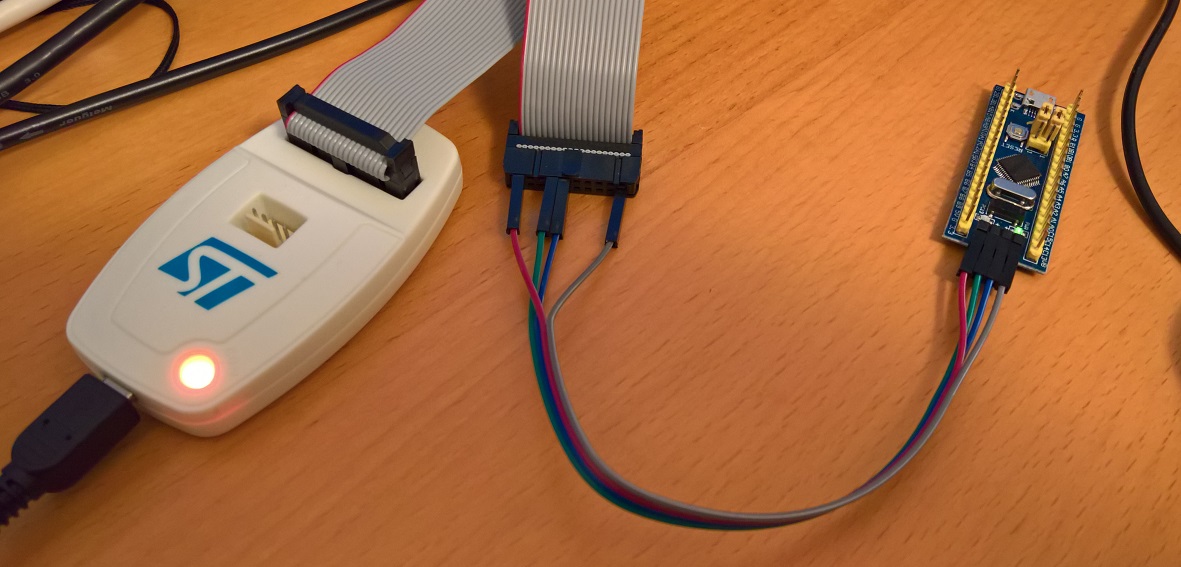
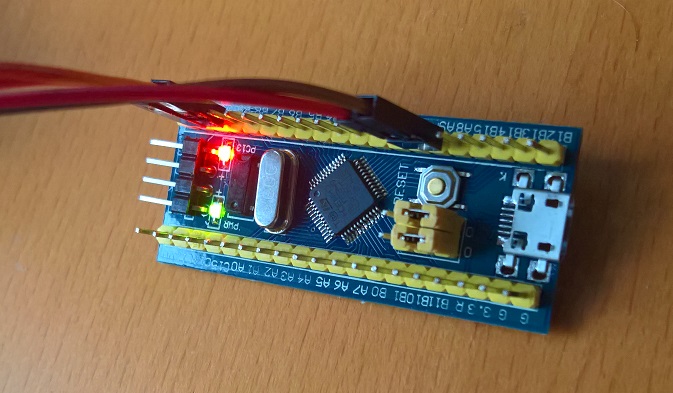
<p>The first step is to connect the 4 pins. In the following picture, red is the
target device voltage, grey is GND, green is IO and blue is CLK. Note that the
device still needs external power, which I supply via the micro USB cable (not
shown).</p>

<p><img src="/images/posts/stm32-debugging.jpg" alt="STM32 attached to the debugger" />
<em>Attaching the STM32 blue pill board to the debugger.</em></p>
<p>OpenOCD is an open source on chip debugger which can be downloaded from their
<a href="http://openocd.org/">website</a>. It takes a client server approach, and the first
step is to start the daemon which connects to the target device. This can be
done using the following command, where -s tells openocd where to search for
scripts and we tell it to use the stlink-v2 config as well as the stm32f1x
config.</p>

<div class="language-bash highlighter-rouge"><div class="highlight"><pre class="highlight"><code>.<span class="se">\o</span>penocd.exe <span class="nt">-s</span> ..<span class="se">\s</span>cripts<span class="se">\ </span><span class="nt">-f</span> interface<span class="se">\s</span>tlink-v2.cfg <span class="nt">-f</span> target<span class="se">\s</span>tm32f1x.cfg
</code></pre></div></div>

<p>Once the OpenOCD daemon is started, we need to use telnet to connect to the
device. For this we can connect to the local machine on port 4444, and can
directly start issuing commands to the device.</p>

<div class="language-bash highlighter-rouge"><div class="highlight"><pre class="highlight"><code>telnet localhost 4444
</code></pre></div></div>

<p>With OpenOCD connected we can start using various commands. The first thing we
can do is reset the device and tell it to break on the first command. This can
be done by calling “reset halt” as follows:</p>

<div class="language-plaintext highlighter-rouge"><div class="highlight"><pre class="highlight"><code>&gt; reset halt
target halted due to debug-request, current mode: Thread
xPSR: 0x01000000 pc: 0x00000152 msp: 0x20005000
</code></pre></div></div>

<p>As can be seen, our program counter (pc) is at 0x152, so if we want to see the
assembler at that point, we can ask OpenOCD to disassemble it for us, using the
<code class="language-plaintext highlighter-rouge">arm disassemble</code> command, giving it the address as well as the number of
instructions to disassemble.</p>

<div class="language-plaintext highlighter-rouge"><div class="highlight"><pre class="highlight"><code>&gt; arm disassemble 0x152 20
0x00000152  0xe92d4ff0  PUSH.W  {r4, r5, r6, r7, r8, r9, r10, r11, r14}
0x00000156  0xb083      SUB     SP, #0xc
0x00000158  0xf2400004  MOVW    r0, #4  ; 0x004
0x0000015c  0xf2400108  MOVW    r1, #8  ; 0x008
0x00000160  0xf2c20000  MOVT    r0, #8192       ; 0x2000
0x00000164  0xf2c20100  MOVT    r1, #8192       ; 0x2000
0x00000168  0x1a09      SUBS    r1, r1, r0
0x0000016a  0x2901      CMP     r1, #0x01
0x0000016c  0xbfa8      IT      GE
0x0000016e  0xf000fb1c  BL      0x000007aa
0x00000172  0xf2400000  MOVW    r0, #0  ; 000
0x00000176  0xf2400104  MOVW    r1, #4  ; 0x004
0x0000017a  0xf2c20000  MOVT    r0, #8192       ; 0x2000
0x0000017e  0xf2c20100  MOVT    r1, #8192       ; 0x2000
0x00000182  0x1a0a      SUBS    r2, r1, r0
0x00000184  0x2a01      CMP     r2, #0x01
0x00000186  0xdb05      BLT     0x00000194
0x00000188  0xf24071f8  MOVW    r1, #2040       ; 0x7f8
0x0000018c  0xf2c00100  MOVT    r1, #0  ; 0000
0x00000190  0xf000fb00  BL      0x00000794
</code></pre></div></div>

<p>We can also use the debugger to dump raw memory, using the <code class="language-plaintext highlighter-rouge">mdb</code> command, we
tell it where and how much memory to dump:</p>

<div class="language-plaintext highlighter-rouge"><div class="highlight"><pre class="highlight"><code>&gt; mdb 0x0 64
0x00000000: 00 50 00 20 53 01 00 00 51 01 00 00 51 01 00 00 51 01 00 00 51 01 00 00 51 01 00 00 00 00 00 00
0x00000020: 51 01 00 00 51 01 00 00 00 00 00 00 51 01 00 00 51 01 00 00 51 01 00 00 51 01 00 00 51 01 00 00
</code></pre></div></div>

<p>Setting breakpoints can be done using the <code class="language-plaintext highlighter-rouge">bp</code> commands, and they can be removed
using the <code class="language-plaintext highlighter-rouge">rbp</code> command, as in the following examples:</p>

<div class="language-plaintext highlighter-rouge"><div class="highlight"><pre class="highlight"><code>&gt; bp 0x7aa 2
breakpoint set at 0x000007aa
&gt; rbp 0x7aa
</code></pre></div></div>

<p>Otherwise there is the <code class="language-plaintext highlighter-rouge">resume</code> command, to continue execution in halted state, as
well as the <code class="language-plaintext highlighter-rouge">step</code> command, to only execute a single opcode.</p>

<p>Another nice command is the <code class="language-plaintext highlighter-rouge">reg</code> command, which dumps all registers:</p>

<div class="language-plaintext highlighter-rouge"><div class="highlight"><pre class="highlight"><code>&gt; reg
===== arm v7m registers
(0) r0 (/32): 0x20000004
(1) r1 (/32): 0x00000004
(2) r2 (/32): 0xD4F014C0
(3) r3 (/32): 0x04A82F37
(4) r4 (/32): 0x20000004
(5) r5 (/32): 0xFFCFFEDD
(6) r6 (/32): 0x0C06C5A6
(7) r7 (/32): 0x390A2280
(8) r8 (/32): 0x9A9F8FD8
(9) r9 (/32): 0xFFDF5B9D
(10) r10 (/32): 0xD4368C54
(11) r11 (/32): 0x680C1352
(12) r12 (/32): 0x7DBEF177
(13) sp (/32): 0x20005000
(14) lr (/32): 0xFFFFFFFF
(15) pc (/32): 0x00000152
(16) xPSR (/32): 0x01000000
(17) msp (/32): 0x20005000
(18) psp (/32): 0xC4E16220
(19) primask (/1): 0x00
(20) basepri (/8): 0x00
(21) faultmask (/1): 0x00
(22) control (/2): 0x00
===== Cortex-M DWT register
(23) dwt_ctrl (/32)
(24) dwt_cyccnt (/32)
(25) dwt_0_comp (/32)
(26) dwt_0_mask (/4)
(27) dwt_0_function (/32)
(28) dwt_1_comp (/32)
(29) dwt_1_mask (/4)
(30) dwt_1_function (/32)
(31) dwt_2_comp (/32)
(32) dwt_2_mask (/4)
(33) dwt_2_function (/32)
(34) dwt_3_comp (/32)
(35) dwt_3_mask (/4)
(36) dwt_3_function (/32)
</code></pre></div></div>

<p>The problem I was facing in my <a href="/posts/2017/09/11/rust-stm32-static-variables">previous
post</a> with my rust code crashing,
seems to be that the code produces the following code for the memory
initialization routine:</p>

<div class="language-plaintext highlighter-rouge"><div class="highlight"><pre class="highlight"><code>&gt; arm disassemble 0x7aa 20
0x000007aa  0xb510      PUSH    {r4, r14}
0x000007ac  0x4604      MOV     r4, r0
0x000007ae  0x2901      CMP     r1, #0x01
0x000007b0  0xbfa4      ITE     GE
0x000007b2  0x4620      MOV     r0, r4
0x000007b4  0xf7fffff9  BL      0x000007aa
</code></pre></div></div>

<p>This code essentially ends up in an infinite loop, because the r1 register is
never changed. Each time it loops it jumps to 0x7aa, which contains a push
command causing the stack pointer to decrease. This continues until the
microcontroller overwrites memory which it is not allowed to write, causing it
to land in a fault interrupt. I’m still not entirely sure why the compiler
produces this code however.</p>

<p>This can be confirmed by running and then halting the microcontroller:</p>]]></content><author><name></name></author><category term="posts" /><summary type="html"><![CDATA[Debugging is a very useful tool when working with Microcontrollers. I decided to order an ST-Link/V2, which is available for a few Euros (I paid roughly 6 EUR for mine). This device supports the SWD protocol for STM32 chips, which allows the chip to be programmed and debugged from 4 pins.]]></summary></entry><entry><title type="html">Rust STM32 Handling Static Variables</title><link href="https://www.rudi-horn.de/posts/2017/09/11/rust-stm32-static-variables.html" rel="alternate" type="text/html" title="Rust STM32 Handling Static Variables" /><published>2017-09-11T10:00:00+00:00</published><updated>2017-09-11T10:00:00+00:00</updated><id>https://www.rudi-horn.de/posts/2017/09/11/rust-stm32-static-variables</id><content type="html" xml:base="https://www.rudi-horn.de/posts/2017/09/11/rust-stm32-static-variables.html"><![CDATA[<p>I’ve just pushed an example showing how to use code that contains statically
initialized variables.</p>

<p>The general problem with static variables can be described as follows. Lets say
we define a static variable INT_DATA and assign it some value as follows:</p>

<div class="language-rust highlighter-rouge"><div class="highlight"><pre class="highlight"><code><span class="k">pub</span> <span class="k">static</span> <span class="k">mut</span> <span class="n">INT_DATA</span> <span class="p">:</span> <span class="nb">u32</span> <span class="o">=</span> <span class="mi">5</span><span class="p">;</span>
</code></pre></div></div>

<p>When we upload our Flash to the microcontroller now however, we are only
overwriting the Flash partition. This means that the value 5 for our static
variable needs to be stored in Flash. This would work fine, until somewhere in
our application we have code which alters this variable such as:</p>

<div class="language-rust highlighter-rouge"><div class="highlight"><pre class="highlight"><code><span class="k">unsafe</span> <span class="p">{</span> <span class="n">INT_DATA</span> <span class="o">=</span> <span class="mi">9</span> <span class="p">};</span>
</code></pre></div></div>

<p>This is problematic because the variable is in Flash, where memory cannot be
modified!</p>

<p>The solution to this problem is to store all variables with values that need to
be initialized in our Flash, and to then copy them to RAM when the application
is loaded. By default all variables with non zero values are stored in the .data
section, while all zeroed static variables are stored in the .bss section, which
must be set to zero during startup.</p>

<p>We start by specifying this in more detail in the linker script. A nice but
cryptic resource on what is required is the following
<a href="http://www.math.utah.edu/docs/info/ld_3.html#SEC18">page</a>.</p>

<p>We use the following updated linker script. We now define a section <code class="language-plaintext highlighter-rouge">.etext</code>
which we use to get the location after everything else in the Flash memory (I
did this because the example using <code class="language-plaintext highlighter-rouge">SIZEOF</code> didn’t seem to quite work with our
setup, but it might be possible). Using it we define the section .data,
specifying AT to be the location of .etext, which makes the physical memory
address of our data in the ROM be the location of <code class="language-plaintext highlighter-rouge">.etext</code>. Finally we also
place <code class="language-plaintext highlighter-rouge">.bss</code> in RAM, without giving it an address in physical memory.</p>

<p>Within the linker script we also export all the addresses as symbol, so that we
can use them within our code. The code <code class="language-plaintext highlighter-rouge">_etext = . ;</code> specifies that the current
location should be stored under the <code class="language-plaintext highlighter-rouge">_etext</code> symbol, which we can use later in
code. In this case <code class="language-plaintext highlighter-rouge">_etext</code> is the physical memory location of the variables
requiring initialization, while <code class="language-plaintext highlighter-rouge">_data</code> and <code class="language-plaintext highlighter-rouge">_edata</code> mark the virtual addresses.
The variables <code class="language-plaintext highlighter-rouge">_bstart</code> and <code class="language-plaintext highlighter-rouge">_bend</code> are the virtual addresses of the memory that
needs to be cleared on startup.</p>

<div class="language-plaintext highlighter-rouge"><div class="highlight"><pre class="highlight"><code>MEMORY
{
  FLASH (rx) : ORIGIN = 0x00000000, LENGTH = 64K
  RAM (rwx)  : ORIGIN = 0x20000000, LENGTH = 20K
}

SECTIONS
{
  /* Set stack top to end of RAM */
  __StackTop = ORIGIN(RAM) + LENGTH(RAM);

  /* first entry should be the stack pointer and then the interrupt table */
  .ivtable :
  {
    LONG(__StackTop);
    KEEP(*(.ivtable));
  } &gt; FLASH

  /* after that the program data is copied */
  .text :
  {
    *(.text*)
 *(.rodata*)
  } &gt; FLASH

  .etext :
  {
 _etext = . ;
  } &gt; FLASH

  /* The data has a virtual address in RAM, but is copied just after the program data */
  .data : AT ( ADDR(.etext) )
  {
    _data = . ;
    *(.data*)
 _edata = . ;
  } &gt; RAM

  /* The data that receives a virtual address in RAM, but needs to be initialized to zero */
  .bss : {
    _bstart = . ;
    *(.bss*) *(COMMON)
 _bend = . ;
  } &gt; RAM
}
</code></pre></div></div>

<p>Now we need a way to be able to get these addresses within our code. This can be
done be defining external variables as follows. To get the address of <code class="language-plaintext highlighter-rouge">_etext</code>
we can then use the code <code class="language-plaintext highlighter-rouge">addr_of!(_etext)</code> using the macro we define below.</p>

<div class="language-rust highlighter-rouge"><div class="highlight"><pre class="highlight"><code><span class="k">extern</span> <span class="p">{</span>
    <span class="k">pub</span> <span class="k">static</span> <span class="n">_etext</span> <span class="p">:</span> <span class="nb">u8</span><span class="p">;</span>
    <span class="k">pub</span> <span class="k">static</span> <span class="n">_data</span> <span class="p">:</span> <span class="nb">u8</span><span class="p">;</span>
    <span class="k">pub</span> <span class="k">static</span> <span class="n">_edata</span> <span class="p">:</span> <span class="nb">u8</span><span class="p">;</span>
    <span class="k">pub</span> <span class="k">static</span> <span class="n">_bstart</span> <span class="p">:</span> <span class="nb">u8</span><span class="p">;</span>
    <span class="k">pub</span> <span class="k">static</span> <span class="n">_bend</span> <span class="p">:</span> <span class="nb">u8</span><span class="p">;</span>
<span class="p">}</span>

<span class="nd">#[macro_export]</span>
<span class="nd">macro_rules!</span> <span class="n">addr_of</span> <span class="p">{</span>
    <span class="p">(</span><span class="nv">$id:expr</span><span class="p">)</span> <span class="k">=&gt;</span> <span class="p">(</span>
        <span class="p">(</span><span class="o">&amp;</span><span class="nv">$id</span> <span class="k">as</span> <span class="o">*</span><span class="k">const</span> <span class="nb">u8</span><span class="p">)</span> <span class="k">as</span> <span class="o">*</span><span class="k">mut</span> <span class="nb">u8</span>
    <span class="p">)</span>
<span class="p">}</span>
</code></pre></div></div>

<p>We now need to define both <code class="language-plaintext highlighter-rouge">memclr</code> and <code class="language-plaintext highlighter-rouge">memcpy</code> functions, which we will need
to initialize the memory. This is fairly straightforward and we use the
following:</p>

<div class="language-rust highlighter-rouge"><div class="highlight"><pre class="highlight"><code><span class="nd">#[no_mangle]</span>
<span class="k">pub</span> <span class="k">unsafe</span> <span class="k">extern</span> <span class="k">fn</span> <span class="nf">__aeabi_memcpy</span><span class="p">(</span><span class="n">dest</span><span class="p">:</span> <span class="o">*</span><span class="k">mut</span> <span class="nb">u8</span><span class="p">,</span> <span class="n">src</span><span class="p">:</span> <span class="o">*</span><span class="k">mut</span> <span class="nb">u8</span><span class="p">,</span> <span class="n">n</span><span class="p">:</span> <span class="nb">isize</span><span class="p">)</span> <span class="k">-&gt;</span> <span class="o">*</span><span class="k">mut</span> <span class="nb">u8</span> <span class="p">{</span>
    <span class="k">let</span> <span class="k">mut</span> <span class="n">i</span> <span class="o">=</span>  <span class="mi">0</span><span class="p">;</span>
    <span class="k">while</span> <span class="n">i</span> <span class="o">&lt;</span> <span class="n">n</span> <span class="p">{</span>
        <span class="o">*</span><span class="n">dest</span><span class="nf">.offset</span><span class="p">(</span><span class="n">i</span><span class="p">)</span> <span class="o">=</span> <span class="o">*</span><span class="n">src</span><span class="nf">.offset</span><span class="p">(</span><span class="n">i</span><span class="p">);</span>
        <span class="n">i</span> <span class="o">+=</span> <span class="mi">1</span><span class="p">;</span>
    <span class="p">}</span>
    <span class="k">return</span> <span class="n">dest</span><span class="p">;</span>
<span class="p">}</span>

<span class="nd">#[no_mangle]</span>
<span class="k">pub</span> <span class="k">unsafe</span> <span class="k">extern</span> <span class="k">fn</span> <span class="nf">__aeabi_memclr</span><span class="p">(</span><span class="n">dest</span><span class="p">:</span> <span class="o">*</span><span class="k">mut</span> <span class="nb">u8</span><span class="p">,</span> <span class="n">n</span><span class="p">:</span> <span class="nb">isize</span><span class="p">)</span> <span class="k">-&gt;</span> <span class="o">*</span><span class="k">mut</span> <span class="nb">u8</span> <span class="p">{</span>
    <span class="k">let</span> <span class="k">mut</span> <span class="n">i</span> <span class="o">=</span>  <span class="mi">0</span><span class="p">;</span>
    <span class="k">while</span> <span class="n">i</span> <span class="o">&lt;</span> <span class="n">n</span> <span class="p">{</span>
        <span class="o">*</span><span class="n">dest</span><span class="nf">.offset</span><span class="p">(</span><span class="n">i</span><span class="p">)</span> <span class="o">=</span> <span class="mi">0u8</span><span class="p">;</span>
        <span class="n">i</span> <span class="o">+=</span> <span class="mi">1</span><span class="p">;</span>
    <span class="p">}</span>
    <span class="k">return</span> <span class="n">dest</span><span class="p">;</span>
<span class="p">}</span>
</code></pre></div></div>

<p>Finally we can define an init_mem function, which we need to call from our main
function. This simply clears the <code class="language-plaintext highlighter-rouge">.bss</code> section using the <code class="language-plaintext highlighter-rouge">memclr</code> function, and
it then uses <code class="language-plaintext highlighter-rouge">memcpy</code> to copy our data from flash to RAM:</p>

<div class="language-rust highlighter-rouge"><div class="highlight"><pre class="highlight"><code><span class="k">pub</span> <span class="k">unsafe</span> <span class="k">fn</span> <span class="nf">init_mem</span><span class="p">()</span> <span class="p">{</span>
    <span class="c1">// zero .bss section</span>
    <span class="nf">__aeabi_memclr</span><span class="p">(</span><span class="nd">addr_of!</span><span class="p">(</span><span class="n">_bstart</span><span class="p">),</span> <span class="nd">addr_of!</span><span class="p">(</span><span class="n">_bend</span><span class="p">)</span> <span class="k">as</span> <span class="nb">isize</span> <span class="o">-</span> <span class="nd">addr_of!</span><span class="p">(</span><span class="n">_bstart</span><span class="p">)</span> <span class="k">as</span> <span class="nb">isize</span><span class="p">);</span>
    <span class="c1">// copy .data section</span>
    <span class="nf">__aeabi_memcpy</span><span class="p">(</span><span class="nd">addr_of!</span><span class="p">(</span><span class="n">_data</span><span class="p">),</span> <span class="nd">addr_of!</span><span class="p">(</span><span class="n">_etext</span><span class="p">),</span> <span class="nd">addr_of!</span><span class="p">(</span><span class="n">_edata</span><span class="p">)</span> <span class="k">as</span> <span class="nb">isize</span> <span class="o">-</span> <span class="nd">addr_of!</span><span class="p">(</span><span class="n">_data</span><span class="p">)</span> <span class="k">as</span> <span class="nb">isize</span><span class="p">);</span>
<span class="p">}</span>
</code></pre></div></div>

<p>This allows the following program to produce the correct output:</p>

<div class="language-rust highlighter-rouge"><div class="highlight"><pre class="highlight"><code><span class="k">pub</span> <span class="k">static</span> <span class="k">mut</span> <span class="n">INT_DATA</span><span class="p">:</span> <span class="nb">u32</span> <span class="o">=</span> <span class="mi">5</span><span class="p">;</span> <span class="c1">// static value</span>
<span class="k">pub</span> <span class="k">static</span> <span class="k">mut</span> <span class="n">INT_BSS</span><span class="p">:</span> <span class="nb">u32</span> <span class="o">=</span> <span class="mi">0</span><span class="p">;</span> <span class="c1">// default value</span>

<span class="k">pub</span> <span class="k">fn</span> <span class="nf">main</span><span class="p">()</span> <span class="p">{</span>
    <span class="k">unsafe</span> <span class="p">{</span> <span class="nn">stm32</span><span class="p">::</span><span class="nn">mem</span><span class="p">::</span><span class="nf">init_mem</span><span class="p">()</span> <span class="p">};</span>

    <span class="c1">// setup system</span>
    <span class="nf">init_clock</span><span class="p">();</span>
    <span class="nf">enable_led</span><span class="p">();</span>
    <span class="nf">enable_uart</span><span class="p">();</span>

    <span class="nf">println</span><span class="p">(</span><span class="s">"STM32 Memory Test App"</span><span class="p">);</span>
    <span class="nf">println</span><span class="p">(</span><span class="s">"  - by Rudi Horn"</span><span class="p">);</span>

    <span class="k">unsafe</span> <span class="p">{</span>
        <span class="nf">print</span><span class="p">(</span><span class="s">"int_data: "</span><span class="p">);</span> <span class="nf">print_int</span><span class="p">(</span><span class="n">INT_DATA</span><span class="p">);</span> <span class="nf">println</span><span class="p">(</span><span class="s">""</span><span class="p">);</span>
        <span class="nf">print</span><span class="p">(</span><span class="s">"int_bss: "</span><span class="p">);</span> <span class="nf">print_int</span><span class="p">(</span><span class="n">INT_BSS</span><span class="p">);</span> <span class="nf">println</span><span class="p">(</span><span class="s">""</span><span class="p">);</span>

        <span class="n">INT_DATA</span> <span class="o">=</span> <span class="mi">9</span><span class="p">;</span> <span class="n">INT_BSS</span> <span class="o">=</span> <span class="mi">99</span><span class="p">;</span>

        <span class="nf">print</span><span class="p">(</span><span class="s">"int_data: "</span><span class="p">);</span> <span class="nf">print_int</span><span class="p">(</span><span class="n">INT_DATA</span><span class="p">);</span> <span class="nf">println</span><span class="p">(</span><span class="s">""</span><span class="p">);</span>
        <span class="nf">print</span><span class="p">(</span><span class="s">"int_bss: "</span><span class="p">);</span> <span class="nf">print_int</span><span class="p">(</span><span class="n">INT_BSS</span><span class="p">);</span> <span class="nf">println</span><span class="p">(</span><span class="s">""</span><span class="p">);</span>
    <span class="p">}</span>

    <span class="k">loop</span> <span class="p">{</span>
    <span class="p">}</span>
<span class="p">}</span>
</code></pre></div></div>

<p>Output:</p>

<div class="language-plaintext highlighter-rouge"><div class="highlight"><pre class="highlight"><code>STM32 Memory Test App
  - by Rudi Horn
int_data: 5
int_bss: 0
int_data: 9
int_bss: 99
</code></pre></div></div>

<p>Browse the <a href="https://github.com/rudihorn/rust-stm32f103-examples/tree/master/stm32-mem">full source
code</a>.</p>

<p>Small note: This example does not compile with <code class="language-plaintext highlighter-rouge">--release</code> for some reason.
Unfortunately I don’t have a debugger (yet) and so it is a bit difficult to find
out what the exact cause is, but it seems to be the <code class="language-plaintext highlighter-rouge">memclr</code> function and may be
related to the actual function call to <code class="language-plaintext highlighter-rouge">memclr</code>. If anyone has any ideas let me
know!</p>]]></content><author><name></name></author><category term="posts" /><summary type="html"><![CDATA[I’ve just pushed an example showing how to use code that contains statically initialized variables.]]></summary></entry><entry><title type="html">Rust on STM32 now on GitHub</title><link href="https://www.rudi-horn.de/posts/2017/09/06/rust-stm32-on-github.html" rel="alternate" type="text/html" title="Rust on STM32 now on GitHub" /><published>2017-09-06T10:00:00+00:00</published><updated>2017-09-06T10:00:00+00:00</updated><id>https://www.rudi-horn.de/posts/2017/09/06/rust-stm32-on-github</id><content type="html" xml:base="https://www.rudi-horn.de/posts/2017/09/06/rust-stm32-on-github.html"><![CDATA[<p>I have decided to publish my <a href="https://github.com/rudihorn/rust-stm32f103">STM32
library</a> on GitHub.</p>

<p>Along with it there is another project with an
<a href="https://github.com/rudihorn/rust-stm32f103-examples">example</a>.</p>]]></content><author><name></name></author><category term="posts" /><summary type="html"><![CDATA[I have decided to publish my STM32 library on GitHub.]]></summary></entry><entry><title type="html">Compiling Rust for Cortex M3</title><link href="https://www.rudi-horn.de/posts/2017/09/04/compiling-rust-for-cortex-m3.html" rel="alternate" type="text/html" title="Compiling Rust for Cortex M3" /><published>2017-09-04T10:00:00+00:00</published><updated>2017-09-04T10:00:00+00:00</updated><id>https://www.rudi-horn.de/posts/2017/09/04/compiling-rust-for-cortex-m3</id><content type="html" xml:base="https://www.rudi-horn.de/posts/2017/09/04/compiling-rust-for-cortex-m3.html"><![CDATA[<p><img src="/images/posts/blue-pill-board.jpg" alt="Blue pill board" /></p>

<p>I was trying to get Rust to work on ARM based on the
<a href="http://www.acrawford.com/2017/03/09/rust-on-the-cortex-m3.html">instructions</a> I
found. Another good resource to look at is
<a href="http://wiki.osdev.org/Raspberry_Pi_Bare_Bones_Rust">here</a>. The goal is to be
able to use rust on the mini STM32F103C8T6 development boards (sometimes
referred to as blue pill), which are cheap but make use of a powerful
microcontroller. Here is another short summary of what is required.</p>

<h1 id="setup">Setup</h1>

<p>The first step is to install rust and set up nightly build (the nightly will
apparently probably still be necessary till the end of 2017). Furthermore xargo
is needed, which can be installed from the rust cargo repository.</p>

<div class="language-bash highlighter-rouge"><div class="highlight"><pre class="highlight"><code>curl https://sh.rustup.rs <span class="nt">-sSf</span> | sh
rustup update nightly
rustup default nightly
rustup component add rust-src
cargo intsall xargo
</code></pre></div></div>

<p>Install the gcc ARM linker:</p>
<div class="language-bash highlighter-rouge"><div class="highlight"><pre class="highlight"><code>apt-get <span class="nb">install </span>gcc-arm-none-eab
</code></pre></div></div>

<p>Now create a new project:</p>
<div class="language-bash highlighter-rouge"><div class="highlight"><pre class="highlight"><code>cargo init <span class="nt">--bin</span> myproject
</code></pre></div></div>

<p>The <code class="language-plaintext highlighter-rouge">cargo.toml</code> file:</p>

<div class="language-toml highlighter-rouge"><div class="highlight"><pre class="highlight"><code><span class="nn">[package]</span>
<span class="py">name</span> <span class="p">=</span> <span class="s">"arm-test"</span>
<span class="py">version</span> <span class="p">=</span> <span class="s">"0.1.0"</span>

<span class="nn">[dependencies]</span>

<span class="nn">[profile.dev]</span>
<span class="py">lto</span> <span class="p">=</span> <span class="kc">true</span>

<span class="nn">[profile.release]</span>
<span class="py">lto</span> <span class="p">=</span> <span class="kc">true</span>
</code></pre></div></div>

<p>Make the directory <code class="language-plaintext highlighter-rouge">.cargo</code> and then create the file <code class="language-plaintext highlighter-rouge">.cargo/config</code>:</p>

<div class="language-toml highlighter-rouge"><div class="highlight"><pre class="highlight"><code><span class="nn">[build]</span>
<span class="py">target</span> <span class="p">=</span> <span class="s">"thumbv7m-none-eabi"</span>

<span class="nn">[target.thumbv7m-none-eabi]</span>
<span class="py">rustflags</span> <span class="p">=</span> <span class="p">[</span>
    <span class="s">"-C"</span><span class="p">,</span> <span class="py">"link-arg</span><span class="p">=</span><span class="err">-nostartfiles</span><span class="s">",</span><span class="err">
</span>    <span class="s">"-C"</span><span class="p">,</span> <span class="py">"link-arg</span><span class="p">=</span><span class="err">-Tlayout.ld</span><span class="s">",</span><span class="err">
</span><span class="p">]</span>
</code></pre></div></div>

<p>We start by editing the file src/main.rs.</p>

<p>For our example we will need to refer to some registers. To do this we define
two structs, <code class="language-plaintext highlighter-rouge">PortRegisters</code> and <code class="language-plaintext highlighter-rouge">RCCRegisters</code>, which refer to a set of
consecutive registers that start at a location. We can make use of type aliases
to tell the compiler that our registers have the type <code class="language-plaintext highlighter-rouge">u32</code>. Having a struct is
useful, because if you look at the datasheet the same format of registers
repeats itself. We can then just define two pointers for <code class="language-plaintext highlighter-rouge">PORT_C</code> and <code class="language-plaintext highlighter-rouge">RCC</code>
which tell the compiler there is a struct of registers at the given address.</p>

<div class="language-rust highlighter-rouge"><div class="highlight"><pre class="highlight"><code><span class="k">type</span> <span class="n">Register</span> <span class="o">=</span> <span class="nb">u32</span><span class="p">;</span>

<span class="c1">// Port Registers</span>
<span class="k">struct</span> <span class="n">PortRegisters</span> <span class="p">{</span>
 <span class="c1">// 0x00: Control register lower</span>
 <span class="n">crl</span> <span class="p">:</span> <span class="n">Register</span><span class="p">,</span>

 <span class="c1">// 0x04: Control register higher</span>
 <span class="n">crh</span><span class="p">:</span> <span class="n">Register</span><span class="p">,</span>

 <span class="c1">// 0x08: Input data register</span>
 <span class="n">idr</span><span class="p">:</span> <span class="n">Register</span><span class="p">,</span>

 <span class="c1">// 0x0c: Output data register</span>
 <span class="n">odr</span><span class="p">:</span> <span class="n">Register</span><span class="p">,</span>

 <span class="c1">// 0x10: Bit set / reset register</span>
 <span class="n">bsrr</span><span class="p">:</span> <span class="n">Register</span><span class="p">,</span>
<span class="p">}</span>

<span class="c1">// Reset and Clock Control</span>
<span class="k">struct</span> <span class="n">RCCRegisters</span> <span class="p">{</span>
 <span class="c1">// 0x00: Clock control register</span>
 <span class="n">cr</span><span class="p">:</span> <span class="n">Register</span><span class="p">,</span>

 <span class="c1">// 0x04: Clock configuration register</span>
 <span class="n">cfgr</span><span class="p">:</span> <span class="n">Register</span><span class="p">,</span>

 <span class="c1">// 0x08: Clock interrupt register</span>
 <span class="n">cir</span><span class="p">:</span> <span class="n">Register</span><span class="p">,</span>

 <span class="c1">// 0x0C: peripheral reset register</span>
 <span class="n">apb2_rstr</span><span class="p">:</span> <span class="n">Register</span><span class="p">,</span>

 <span class="c1">// 0x10: peripheral reset register</span>
 <span class="n">apb1_rstr</span><span class="p">:</span> <span class="n">Register</span><span class="p">,</span>

 <span class="c1">// 0x14: peripheral clock enable register</span>
 <span class="n">ahb_enr</span><span class="p">:</span> <span class="n">Register</span><span class="p">,</span>

 <span class="c1">// 0x18: peripheral clock enable register</span>
 <span class="n">apb2_enr</span><span class="p">:</span> <span class="n">Register</span><span class="p">,</span>

<span class="p">}</span>

<span class="k">const</span> <span class="n">RCC</span><span class="p">:</span> <span class="o">*</span><span class="k">mut</span> <span class="n">RCCRegisters</span> <span class="o">=</span>    <span class="mi">0x40021000</span> <span class="k">as</span> <span class="o">*</span><span class="k">mut</span> <span class="n">RCCRegisters</span><span class="p">;</span>
<span class="k">const</span> <span class="n">PORT_C</span><span class="p">:</span> <span class="o">*</span><span class="k">mut</span> <span class="n">PortRegisters</span> <span class="o">=</span> <span class="mi">0x40011000</span> <span class="k">as</span> <span class="o">*</span><span class="k">mut</span> <span class="n">PortRegisters</span><span class="p">;</span>
</code></pre></div></div>

<p>Next we define the main function, which does three things. First it enables the
clock for the PORT C peripheral. This is done by writing to the APB2 ENR
register of RCC. After that it sets the pin C13 to an output, and sets the
output value for the entire PORTC to 0 (keep in mind the other pins are
floating). We mark this function as <code class="language-plaintext highlighter-rouge">#[naked]</code>, because there is no stack yet.</p>

<div class="language-rust highlighter-rouge"><div class="highlight"><pre class="highlight"><code><span class="nd">#[naked]</span>
<span class="k">fn</span> <span class="nf">main</span><span class="p">()</span> <span class="p">{</span>
 <span class="k">unsafe</span> <span class="p">{</span>
  <span class="c1">// enable clock for PORTC</span>
  <span class="p">(</span><span class="o">*</span><span class="n">RCC</span><span class="p">)</span><span class="py">.apb2_enr</span> <span class="o">=</span> <span class="p">(</span><span class="mi">1</span> <span class="o">&lt;&lt;</span> <span class="mi">4</span><span class="p">);</span>
  <span class="c1">// set port C13 to output</span>
  <span class="p">(</span><span class="o">*</span><span class="n">PORT_C</span><span class="p">)</span><span class="py">.crh</span><span class="o">=</span> <span class="mi">0x44344444</span><span class="p">;</span>
  <span class="c1">// set output data registor to 0</span>
  <span class="p">(</span><span class="o">*</span><span class="n">PORT_C</span><span class="p">)</span><span class="py">.odr</span> <span class="o">=</span> <span class="mi">0</span><span class="p">;</span>
 <span class="p">}</span>

 <span class="k">loop</span> <span class="p">{}</span>
<span class="p">}</span>
</code></pre></div></div>

<p>We can then define the interrupts function. We want all other interrupts to
simply stop the microcontroller in a loop.</p>

<div class="language-rust highlighter-rouge"><div class="highlight"><pre class="highlight"><code><span class="nd">#[naked]</span>
<span class="k">fn</span> <span class="nf">interrupts</span><span class="p">()</span> <span class="p">{</span>
 <span class="k">loop</span> <span class="p">{}</span>
<span class="p">}</span>
</code></pre></div></div>

<p>If we look at the default / sample application which was downloaded off the
newly bought STM device, we can see that the binary of the file starts with the
value 0x20000400, which is the default stack pointer location. After that it
contains the address 0x80000145, which defines the memory address referring to
the first instruction in flash. The further 32 bit words contain the entry
points for interrupts. Note that the flash is mapped into memory twice, once at
0x08000000 and again at 0x00000000. This is why our code works, even though as
you may see the memory addresses for the entry point differ between our sample
and the app we generate. This file is normally located at 0x0800000 in memory.</p>

<div class="language-plaintext highlighter-rouge"><div class="highlight"><pre class="highlight"><code>Offset(h) 00 01 02 03 04 05 06 07 08 09 0A 0B 0C 0D 0E 0F

00000000  00 04 00 20 45 01 00 08 E7 02 00 08 DF 02 00 08  ... E...ç...ß...
00000010  E3 02 00 08 8D 01 00 08 5D 04 00 08 00 00 00 00  ã.......].......
00000020  00 00 00 00 00 00 00 00 00 00 00 00 0D 03 00 08  ................
00000030  91 01 00 08 00 00 00 00 E9 02 00 08 F9 03 00 08  ‘.......é...ù...
00000040  5F 01 00 08 5F 01 00 08 5F 01 00 08 5F 01 00 08  _..._..._..._...
00000050  5F 01 00 08 5F 01 00 08 5F 01 00 08 5F 01 00 08  _..._..._..._...
00000060  5F 01 00 08 5F 01 00 08 5F 01 00 08 5F 01 00 08  _..._..._..._...
00000070  5F 01 00 08 5F 01 00 08 5F 01 00 08 5F 01 00 08  _..._..._..._...
00000080  5F 01 00 08 5F 01 00 08 5F 01 00 08 5F 01 00 08  _..._..._..._...
00000090  5F 01 00 08 5F 01 00 08 5F 01 00 08 5F 01 00 08  _..._..._..._...
000000A0  5F 01 00 08 5F 01 00 08 5F 01 00 08 5F 01 00 08  _..._..._..._...
000000B0  5F 01 00 08 5F 01 00 08 5F 01 00 08 5F 01 00 08  _..._..._..._...
000000C0  5F 01 00 08 5F 01 00 08 5F 01 00 08 5F 01 00 08  _..._..._..._...
000000D0  5F 01 00 08 5F 01 00 08 5F 01 00 08 5F 01 00 08  _..._..._..._...
000000E0  5F 01 00 08 5F 01 00 08 5F 01 00 08 5F 01 00 08  _..._..._..._...
000000F0  5F 01 00 08 5F 01 00 08 5F 01 00 08 5F 01 00 08  _..._..._..._...
00000100  5F 01 00 08 5F 01 00 08 5F 01 00 08 5F 01 00 08  _..._..._..._...
00000110  5F 01 00 08 5F 01 00 08 5F 01 00 08 5F 01 00 08  _..._..._..._...
00000120  5F 01 00 08 5F 01 00 08 5F 01 00 08 5F 01 00 08  _..._..._..._...
00000130  DF F8 0C D0 00 F0 18 F8 00 48 00 47 81 04 00 08  ßø.Ð.ð.ø.H.G....
00000140  00 04 00 20 06 48 80 47 06 48 00 47 FE E7 FE E7  ... .H€G.H.Gþçþç
00000150  FE E7 FE E7 FE E7 FE E7 FE E7 FE E7 FE E7 FE E7  þçþçþçþçþçþçþçþç
00000160  FD 03 00 08 31 01 00 08 06 4C 07 4D 06 E0 E0 68  ý...1....L.M.ààh
00000170  40 F0 01 03 94 E8 07 00 98 47 10 34 AC 42 F6 D3  @ð..”è..˜G.4¬BöÓ
00000180  FF F7 DA FF BC 04 00 08 CC 04 00 08 00 BF FE E7  ÿ÷Úÿ¼...Ì....¿þç
</code></pre></div></div>

<p>We can define this in rust using a structure which contains our interrupt vector
table. We then define a static instance of this struct, and define the
entrypoint to be the function main, while all of the other interrupts are set to
a dummy interrupt which just loops. Note that the #[link_section] directive
defines the section which we refer to later in the linker script. Also note the
#[used] directive, this is very important for compiling for release, as
otherwise everything is optimized away!</p>

<div class="language-rust highlighter-rouge"><div class="highlight"><pre class="highlight"><code><span class="k">type</span> <span class="n">IVFunction</span> <span class="o">=</span> <span class="k">fn</span> <span class="p">();</span>

<span class="k">struct</span> <span class="n">IVTable</span> <span class="p">{</span>
 <span class="n">main</span><span class="p">:</span> <span class="n">IVFunction</span><span class="p">,</span>
 <span class="n">nmi_handler</span><span class="p">:</span> <span class="n">IVFunction</span><span class="p">,</span>
 <span class="n">hard_fault</span><span class="p">:</span> <span class="n">IVFunction</span><span class="p">,</span>
 <span class="n">bus_fault</span><span class="p">:</span> <span class="n">IVFunction</span><span class="p">,</span>
 <span class="n">usage_fault</span><span class="p">:</span> <span class="n">IVFunction</span><span class="p">,</span>
<span class="p">}</span>

<span class="nd">#[link_section</span> <span class="nd">=</span> <span class="s">".ivtable"</span><span class="nd">]</span>
<span class="nd">#[used]</span>
<span class="k">static</span> <span class="n">IVTABLE</span><span class="p">:</span> <span class="n">IVTable</span> <span class="o">=</span> <span class="n">IVTable</span> <span class="p">{</span>
 <span class="n">main</span><span class="p">:</span> <span class="n">main</span><span class="p">,</span>
 <span class="n">nmi_handler</span><span class="p">:</span> <span class="n">interrupts</span><span class="p">,</span>
 <span class="n">hard_fault</span><span class="p">:</span> <span class="n">interrupts</span><span class="p">,</span>
 <span class="n">bus_fault</span><span class="p">:</span> <span class="n">interrupts</span><span class="p">,</span>
 <span class="n">usage_fault</span><span class="p">:</span> <span class="n">interrupts</span>
<span class="p">};</span>
</code></pre></div></div>

<p>At the beginnig of the rust file we need to remove the std library, declare that
there isn’t a main function and the features for assembler, language items,
start and naked functions. Then we need to declare two dummy functions for
panics and <code class="language-plaintext highlighter-rouge">eh_personality</code>.</p>

<div class="language-rust highlighter-rouge"><div class="highlight"><pre class="highlight"><code><span class="nd">#![no_std]</span>
<span class="nd">#![no_main]</span>
<span class="nd">#![feature(asm,</span> <span class="nd">lang_items,</span> <span class="nd">start,</span> <span class="nd">naked_functions)]</span>

<span class="nd">#[lang</span> <span class="nd">=</span> <span class="s">"panic_fmt"</span><span class="nd">]</span>
<span class="k">pub</span> <span class="k">extern</span> <span class="k">fn</span> <span class="nf">rust_begin_unwind</span><span class="p">(</span><span class="n">_</span><span class="p">:</span> <span class="p">::</span><span class="nn">core</span><span class="p">::</span><span class="nn">fmt</span><span class="p">::</span><span class="n">Arguments</span><span class="p">,</span> <span class="n">_</span><span class="p">:</span> <span class="o">&amp;</span><span class="k">'static</span> <span class="nb">str</span><span class="p">,</span> <span class="n">_</span><span class="p">:</span> <span class="nb">u32</span><span class="p">)</span> <span class="k">-&gt;</span> <span class="o">!</span> <span class="p">{</span>
 <span class="k">loop</span> <span class="p">{}</span>
<span class="p">}</span>

<span class="nd">#[lang</span> <span class="nd">=</span> <span class="s">"eh_personality"</span><span class="nd">]</span>
<span class="k">pub</span> <span class="k">extern</span> <span class="k">fn</span> <span class="nf">rust_eh_unwind_resume</span><span class="p">()</span> <span class="p">{</span>
<span class="p">}</span>
</code></pre></div></div>

<p>The compiler requires a linker script to know how to build the binary. We first
declare the memory layout of our device and then we declare a a text section,
which should first contain a long word with the stack address, which we
calculate as the top of the RAM address and then it should contain the ivtable.
We then skip forward to address 0xD8, and include the rest of the “.text”
section there (our main program execution code, including the main method).</p>

<div class="language-plaintext highlighter-rouge"><div class="highlight"><pre class="highlight"><code>MEMORY
{
  FLASH (rx) : ORIGIN = 0x00000000, LENGTH = 64K
  RAM (rwx)  : ORIGIN = 0x20000000, LENGTH = 20K
}

SECTIONS
{
  /* Set stack top to end of RAM */
  __StackTop = ORIGIN(RAM) + LENGTH(RAM);

  .text :
  {
    LONG(__StackTop);
    KEEP(*(.ivtable));

        . = 0xD8;

    *(.text*)
  } &gt; FLASH
}
</code></pre></div></div>

<p>We can then build our application using the following commands:</p>

<div class="language-bash highlighter-rouge"><div class="highlight"><pre class="highlight"><code>xargo build
arm-none-eabi-objcopy <span class="nt">-O</span> binary target/thumbv7m-none-eabi/debug/&lt;myproj&gt; &lt;myproj&gt;.bin
</code></pre></div></div>

<p>If you wan’t you can dissasemble it using the following command, which I
recommend doing if you run into any bugs. The assembly output can be seen
<a href="/downloads/posts/arm-test-dump.txt">here</a>.</p>

<div class="language-bash highlighter-rouge"><div class="highlight"><pre class="highlight"><code>arm-none-eabi-objdump <span class="nt">-d</span> target/thumbv7m-none-eabi/debug/&lt;myproj&gt;
</code></pre></div></div>

<p>I then flashed the .bin file to the microcontroller using the <a href="http://www.st.com/en/development-tools/flasher-stm32.html">STM32 flash
tool</a>.</p>

<p>Dowload the <a href="/downloads/posts/arm-test.tar.gz">full source code</a>.</p>]]></content><author><name></name></author><category term="posts" /><summary type="html"><![CDATA[]]></summary></entry><entry><title type="html">Bottle Cleaner Prototype</title><link href="https://www.rudi-horn.de/posts/2017/07/15/bottle-cleaner-prototype.html" rel="alternate" type="text/html" title="Bottle Cleaner Prototype" /><published>2017-07-15T10:00:00+00:00</published><updated>2017-07-15T10:00:00+00:00</updated><id>https://www.rudi-horn.de/posts/2017/07/15/bottle-cleaner-prototype</id><content type="html" xml:base="https://www.rudi-horn.de/posts/2017/07/15/bottle-cleaner-prototype.html"><![CDATA[<p>Bottle cleaning can be a tedious and time consuming task to perform. As such I
have been trying to experiment with creating something to clean bottles, similar
to projects using the <a href="https://www.youtube.com/watch?v=_iJcG6HbSsE">FastRack bottle drying
tray</a>.</p>

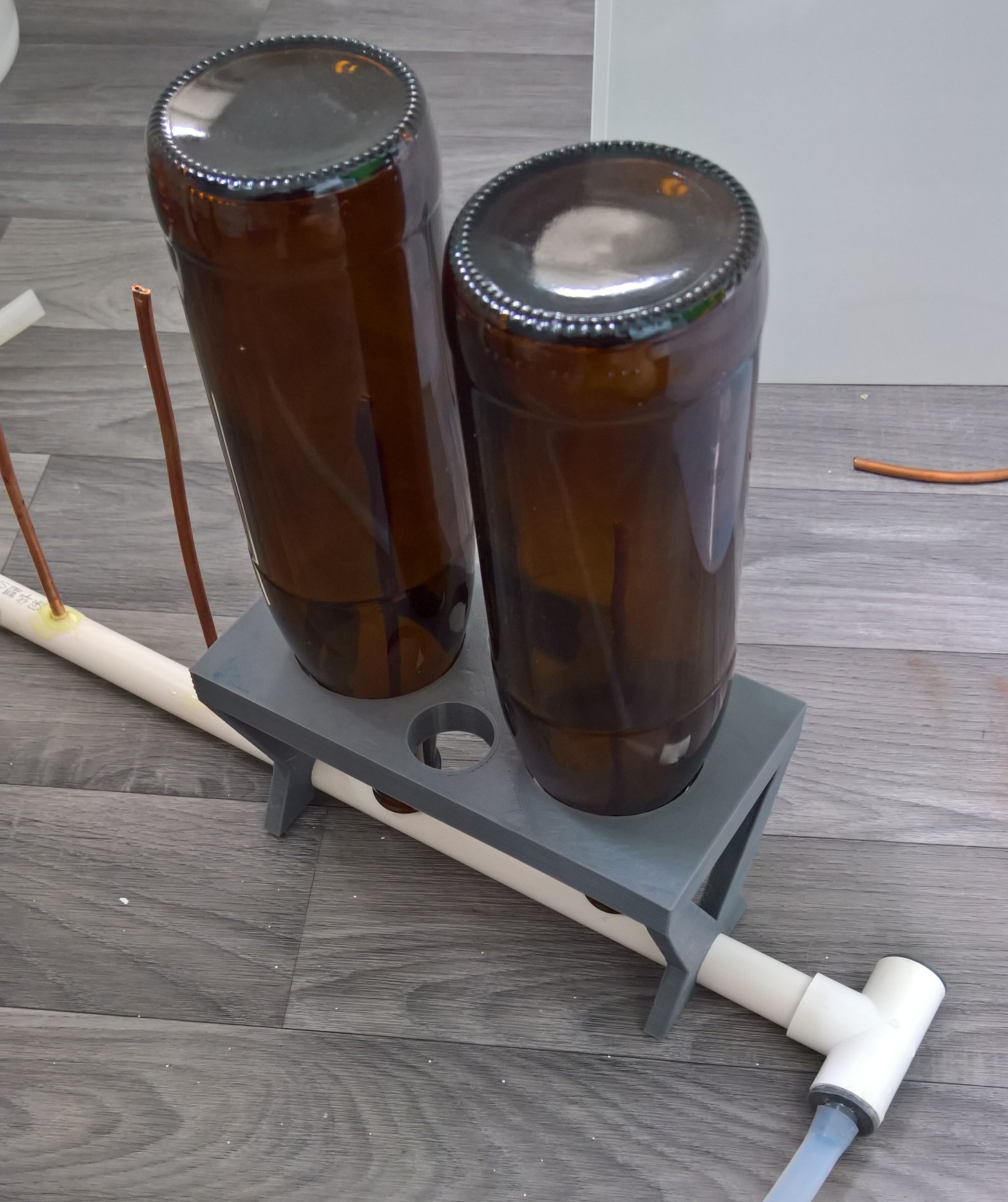
<p>The prototype consists out of 20mm outer diameter PVC conduit pipe with 5mm
outer diameter copper pipe glued in 80mm intervals 3.5” intervals (estimated to
be the distance of FastRack, without actually having a FastRack to measure
from). The copper pipe is slightly squeezed together at the ends in order to
increase pressure within the system.</p>

<p>The centrifugal submersible pump used can be bought off
<a href="https://www.aliexpress.com/item/New-10L-min-12V-DC-Mini-Brushless-Motor-Submersible-Water-Pump-3-3M-Amphibious/32731443626.html">Aliexpress</a>
and is roughly sufficient for 4 bottles at a time (but cheap enough if more are
needed):</p>

<p><img src="/images/posts/bottle-cleaner-printed.jpg" alt="3D printed bottle holder" />
<em>The bottle holder is a quick 3D printed mockup (took roughly 7 hours to print, so not really suitable for the entire device but good for testing)</em></p>

<p><img src="/images/posts/bottle-cleaner-model.png" alt="3D model of bottle holder" />
<em>The 3D model of the bottle holder.</em></p>

<p><strong>Update:</strong> I ended up ordering a Fastrack, and the 3x4 bottle tray seems to have a hole distance of 80mm (surprisingly metric ☺).</p>

<p><strong>Update 2:</strong> The Fastrack was sent back, because it was incomplete, and I didn’t reorder a new one.</p>]]></content><author><name></name></author><category term="posts" /><summary type="html"><![CDATA[Bottle cleaning can be a tedious and time consuming task to perform. As such I have been trying to experiment with creating something to clean bottles, similar to projects using the FastRack bottle drying tray.]]></summary></entry><entry><title type="html">Welcome to my new Site!</title><link href="https://www.rudi-horn.de/posts/2017/07/14/welcome-to-my-new-site.html" rel="alternate" type="text/html" title="Welcome to my new Site!" /><published>2017-07-14T10:00:00+00:00</published><updated>2017-07-14T10:00:00+00:00</updated><id>https://www.rudi-horn.de/posts/2017/07/14/welcome-to-my-new-site</id><content type="html" xml:base="https://www.rudi-horn.de/posts/2017/07/14/welcome-to-my-new-site.html"><![CDATA[<p>Welcome to my new webpage!</p>

<p>My homepage is finally dynamically editable without having to change the project
itself, meaning I am hoping to contribute much more actively in the future. This
is also because the website supports blog style entries, meaning less
significant projects can just be posted as blog entries.</p>

<p>For more information about me check out my <a href="/about">about page</a> or any of the
other projects posted on this website.</p>]]></content><author><name></name></author><category term="posts" /><summary type="html"><![CDATA[Welcome to my new webpage!]]></summary></entry></feed>